MindDrive AI OBD Lite: Offline OBD-II diagnostics with on-device AI
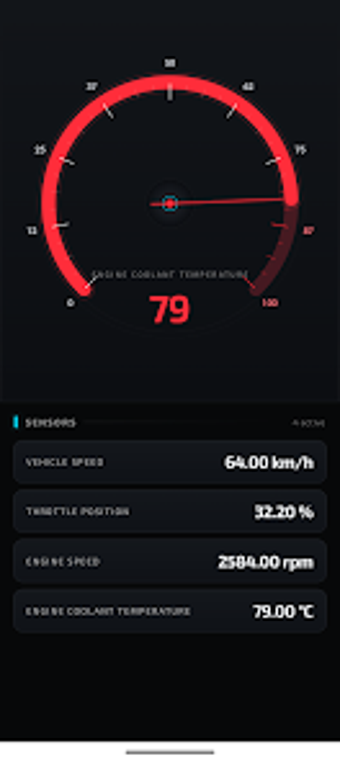
Experience MindDrive AI OBD Lite from Gearhead Research, an Android diagnostic assistant that turns a smartphone into a vehicle scanner. It uses on-device AI to translate OBD-II fault codes into concise plain-language explanations, stream live ECU metrics such as RPM and coolant temperature, and read or clear stored, pending, and permanent DTCs. Customizable dashboards, battery health monitoring, and multi-language support prioritize privacy and fast local analysis. The app targets car owners, DIY mechanics, and privacy-minded drivers seeking clear offline diagnostics.
How MindDrive translates technical faults for drivers
Experience an AI-powered translator for Diagnostic Trouble Codes. MindDrive parses both generic and manufacturer-specific codes and presents concise plain-language explanations with suggested repair guidance. The fault scanner can read and clear stored, pending, and permanent DTCs, which the app uses to update the check engine status. Typical uses include quick pre-repair checks and targeted troubleshooting by DIY mechanics who need an explanation they can act on.
Does on-device AI affect phone performance?
Because diagnostic logic runs entirely on the phone, all interpretation and analysis happens locally, removing dependence on a network connection and reducing latency during scans. This offline design supports roadside diagnosis and operation in remote locations without internet access. The app requires an external OBD-II Bluetooth or WiFi adapter to stream ECU metrics, so perceived performance also depends on the adapter's connection stability and the Android device's available processing headroom.
Is it safe to clear codes and operate near a live vehicle?
MindDrive follows a privacy-first architecture: the developer declares on-device processing with no third-party data sharing, so diagnostics remain local. The fault-clearing function can reset the check engine light, but clearing codes does not repair mechanical faults, so confirm repairs before erasing stored trouble codes. For any ECU write action, maintain a stable adapter link to avoid interrupted commands that could leave incomplete changes in vehicle systems.
Do I need technical knowledge to use MindDrive?
The interface addresses beginners and advanced users by offering clear, human-readable descriptions alongside configurable digital gauges. Custom dashboards let technical users monitor specific sensors while multi-language menus support English, Italian, French, and German. Community notes cite a clean UI and stable links with standard ELM327 adapters, and the absence of advertisements improves uninterrupted diagnostics. The primary setup step for non-technical owners is acquiring and pairing a compatible OBD-II adapter.
Practical and privacy-focused for DIY users, with a hardware caveat
MindDrive is a practical option for car owners and DIY mechanics who need local, human-readable OBD-II interpretation without relying on a network. The chief limitation is the requirement for a compatible OBD-II adapter and the Android device's processing headroom. For best results, perform an initial idle scan with a stable adapter link to establish baseline readings before troubleshooting; this keeps diagnostics private and usable in remote locations.